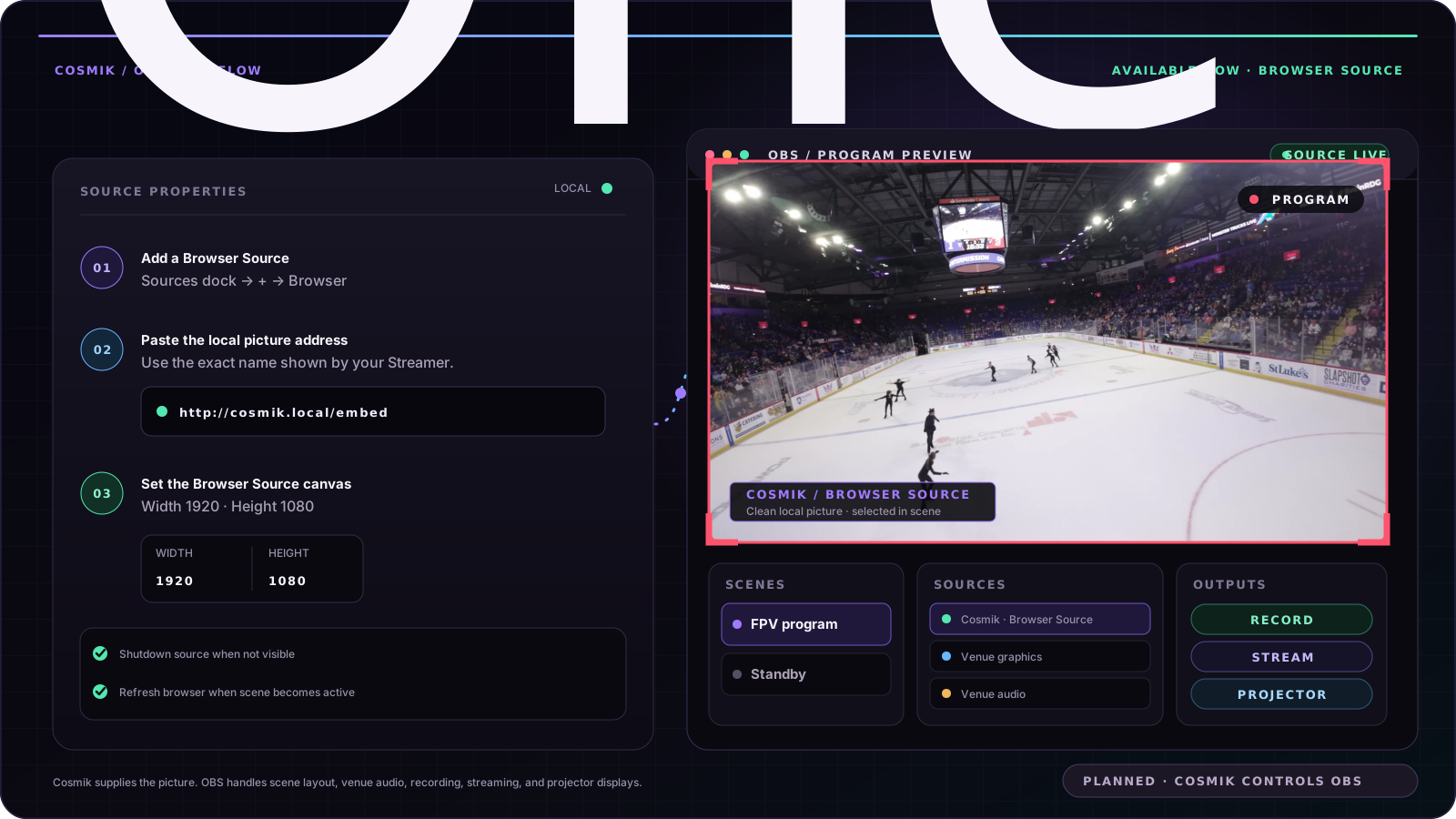
Cosmik can supply the goggles picture to OBS Studio as a Browser Source. Once it is inside an OBS scene, OBS can position it, layer other sources over or beside it, record the finished program, stream it, or send it to a projector output.
Available now: OBS receives the Cosmik picture. Planned, not built: Cosmik controls OBS recording, streaming, or scene switching.
Add the Browser Source
- In OBS, add a Browser Source.
Paste this address:
http://cosmik.local/embed- Set Width to 1920 and Height to 1080.
- Turn on Shutdown source when not visible and Refresh browser when scene becomes active.
If the Streamer uses a collision name such as cosmik-2.local, use that exact name and add /embed.
This route uses the same local WebRTC connection as the browser viewer. It was checked on the real development device and the owner then confirmed the picture in OBS. The RTSP route also worked in an OBS Media Source, but its buffer made it materially slower in that check. No public latency number is claimed.
Choose the picture
| Address | Picture |
|---|---|
http://cosmik.local/embed | The complete clean goggles picture |
http://cosmik.local/embed?src=broadcast | Cosmik's separate broadcast branch with its enabled graphics |
http://cosmik.local/embed?fit=fill | A cropped picture that fills the Browser Source frame |
The embed page contains only the picture. It does not include Cosmik buttons, navigation, or owner controls.
src=broadcast only shows a picture while the separate broadcast branch is running.
Build the OBS scene
The Cosmik source behaves like another picture source in OBS. You can:
- place and resize it in the scene;
- layer venue graphics, scores, sponsor artwork, or other camera sources;
- record or stream the finished OBS program; and
- use an OBS fullscreen or windowed projector output for a display.
The DJI air unit carries no audio, so the Cosmik picture is silent. Add venue sound, commentary, or another approved audio input as a separate OBS source.
The ordinary Cosmik viewer and local recording can continue while OBS receives its own copy.
Framing a 4:3 picture
The goggles can send a 4:3 picture while an OBS program is 16:9.
- The default
/embedaddress keeps the complete picture and may show bars at the sides. ?fit=fillfills the frame by cropping part of the picture.- OBS can also size and crop the default source inside the scene.
The clean Cosmik viewer and recording path are unchanged by the layout built in OBS.
If OBS shows nothing
- Open the ordinary viewer in a browser. If no picture appears there, OBS cannot receive it.
- Confirm the OBS source type is Browser Source, not Media Source.
- Confirm the address matches Console → Network → Share with viewers, then add
/embed. - Confirm Shutdown source when not visible and Refresh browser when scene becomes active are enabled.
Cosmik does not accept video from OBS or another computer. It supplies the goggles picture to the production tool; it does not expose an unauthenticated network video input.
For OBS's own controls, see the official Browser Source guide, Sources guide, and Projectors guide.
Source: /docs/obs-and-production-tools.md