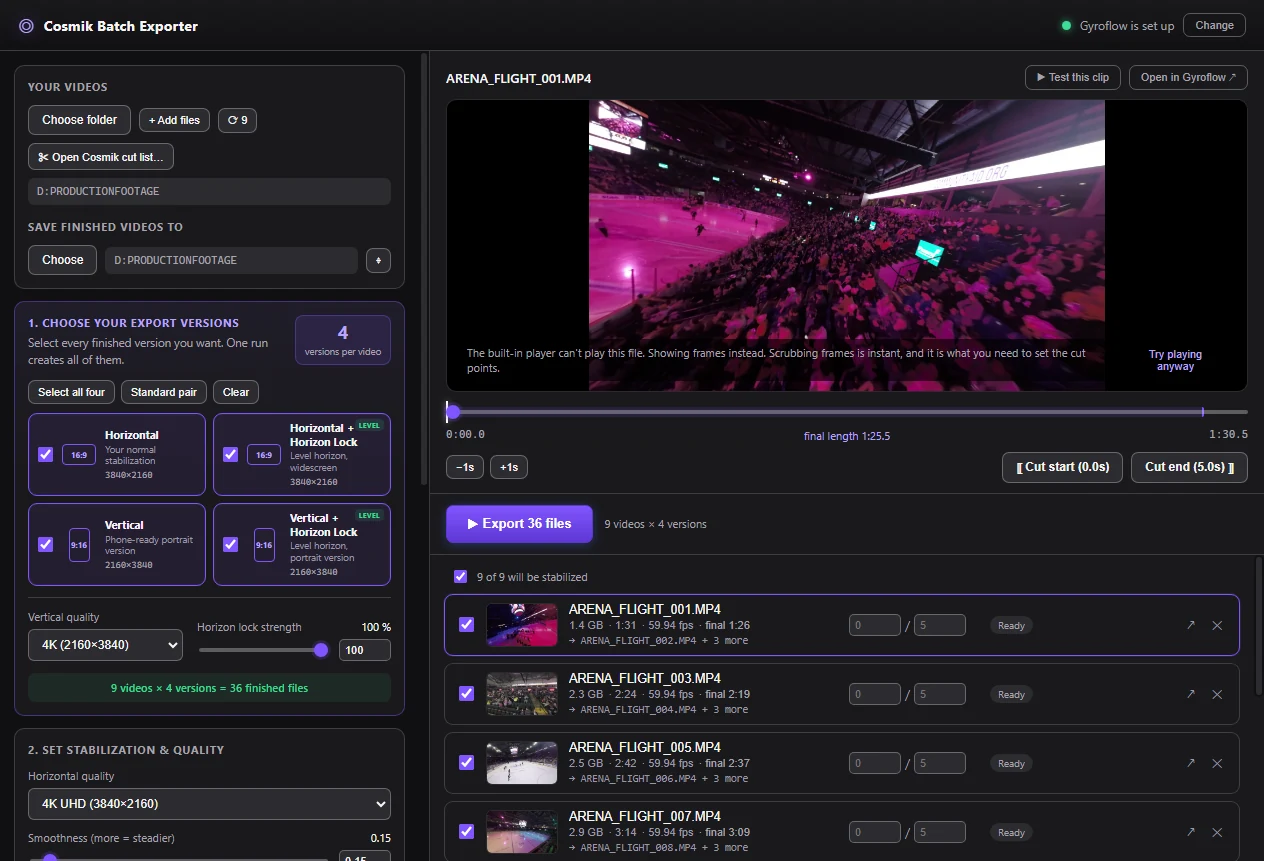
Cosmik Batch Exporter is a free desktop utility. It sends folders of video through an installed copy of Gyroflow, applies trims, and produces the output versions you select. It does not require a Cosmik Streamer licence.
What it does
- Imports a folder of videos, individual files, or a Cosmik Streamer shot list bundle.
- Previews footage and sets a global trim or a different trim for one file.
- Exports horizontal, horizontal horizon-locked, vertical, and vertical horizon-locked versions in one queued run.
- Keeps horizontal and vertical resolution settings separate.
- Supports Gyroflow smoothness, horizon lock, zoom, codec, pixel format, GPU, and advanced command-line options.
- Saves presets, remembers folders and settings, and reports progress for every output.
- Opens a selected clip in the full Gyroflow interface when a job needs manual adjustment.
- Preserves the source file. The Exporter does not pre-trim or re-encode it before Gyroflow reads its motion data.
- Combines flights the camera split into several files back into one video (see below).
Flights split into several files
DJI air units, DJI goggles and GoPros cut a long flight into several files of about 4 GB each. On an O4 air unit that is roughly every 3.7 minutes, so one flight ends abruptly in one file and carries on in the next.
The Combine split recordings switch, under Add videos (and on the Cosmik Streamer page), is on by default:
- On: the pieces of one flight show as one row and export as one video. They are joined without re-encoding, and the motion data Gyroflow stabilizes from stays in sync across the joins. Each joined video is checked before it is used: it must be as long as its pieces added together, and the motion data must still be there.
- Off: every file stays separate, and each piece says which part of a flight it is.
The Exporter treats files as pieces of one flight only when the file numbers follow each other, the video settings are identical, and the next file starts where the previous one ended. If two files look like pieces of one flight but are kept apart, the file says why.
Useful buttons for a split flight:
- Combine now (in This clip) joins the flight before you export, so the preview, the movement chart, trims, the parts you keep, Color and Open in Gyroflow cover the whole flight instead of its first piece. The export then reuses that file.
- Combine all now (under Split recordings) saves every split flight in the list, joined but not stabilized, to the Joined recordings folder inside your output folder.
Joined files are written next to your exports and need about as much free space as the pieces together. Your original files are never changed.
What you need
- Windows 10 or 11 (64-bit), or a Mac (Apple Silicon or Intel). The Mac version has not yet been confirmed on real Mac hardware.
- Gyroflow installed on that computer.
- The footage you want to process.
- Cosmik Streamer only if you want to import its requested-clip bundle. The Exporter also works on ordinary folders without a Streamer.
Using a Streamer shot list
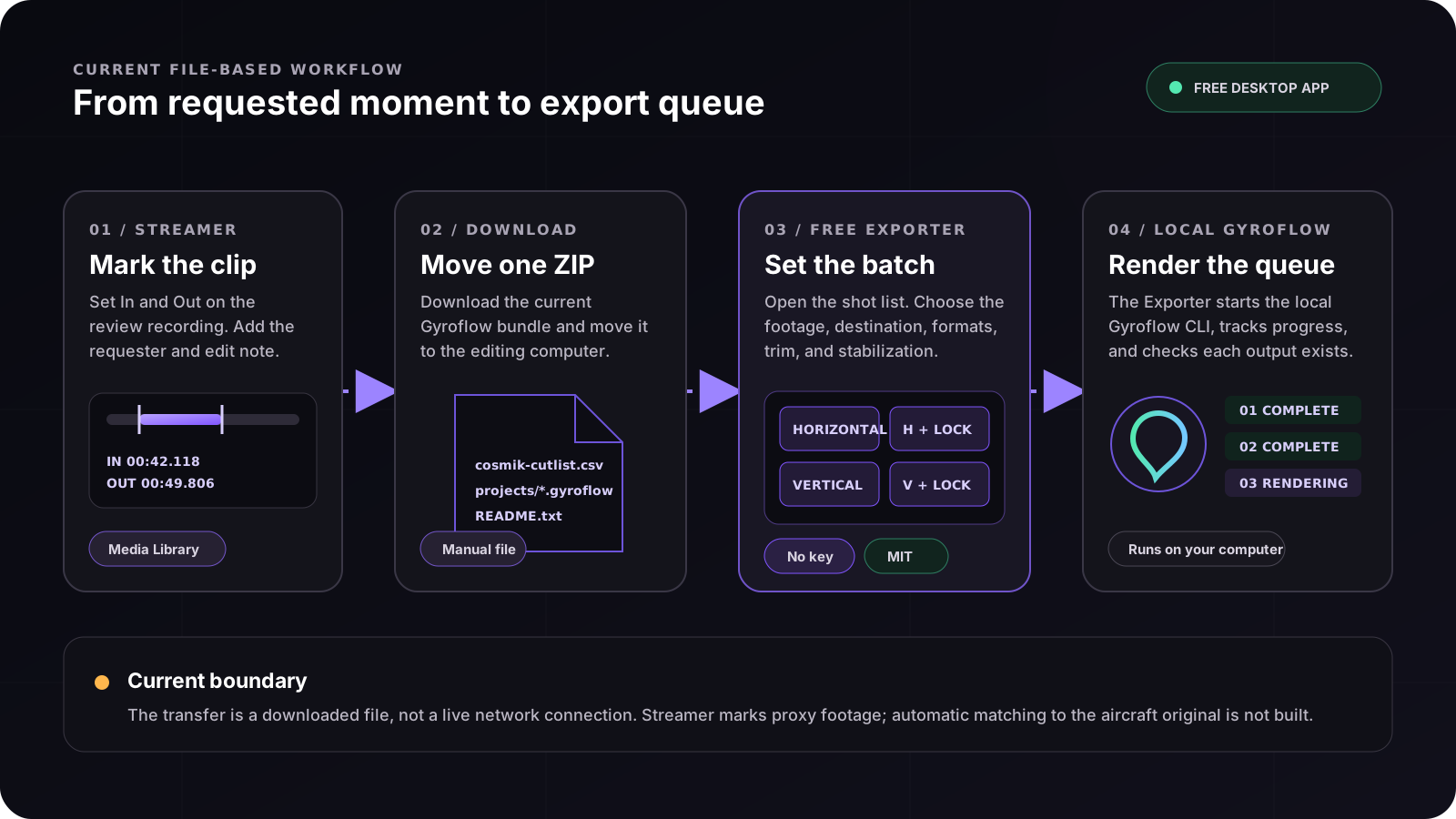
- In Cosmik Streamer → Media Library, mark the requested clips and download the Gyroflow bundle.
- Move the downloaded ZIP to the computer that holds the footage.
- Open Cosmik Batch Exporter and choose Open Cosmik shot list.
- If the recordings have moved, select the folder that contains them.
- Choose the destination folder, output versions, resolution, and stabilization settings.
- Start the batch. The Exporter sends each job to the installed Gyroflow command-line tool and verifies that an output file was produced.
The Exporter accepts the Streamer's ZIP, an extracted bundle folder, or the cosmik-cutlist.csv file itself. It reads columns by name, refuses an unsupported timebase, and lists requests whose recording cannot be found.
Current integration boundary
The Streamer and Exporter exchange a file. They do not discover or control each other over the network.
Current Streamer requests are marked against the Streamer's live-view recording. That review recording carries no motion data, so Gyroflow can trim it but cannot stabilize it. The Exporter can be pointed at footage from the aircraft or action camera, but the pilot must confirm that the file and timing match. Automatic matching between the review recording and the original card footage is not built.
Price and licence
Cosmik Batch Exporter is free and MIT-licensed. It has no activation key and does not consume a Cosmik Streamer licence. Gyroflow is installed separately under its own licence.
Download it from the Free Exporter page. The installers are not code-signed yet, so Windows and macOS ask you to confirm the first time it runs; the page explains the step. Once installed, Check for updates beside the version number tells you when a new version is out.
Source: /docs/cosmik-batch-exporter.md